Object tracking

Synonyms
Tracking
Description

Microtubule end tracking in live cell fluorescent images of Drosophila oocyte involves overcoming the following challenges, which can be tackled by a series of preprocessing steps and tracking described in Parton et al (2011)

  • illumination flicker & photobleaching: suppress by normalising intensities, e.g. using Image->Adjust->Bleach Correction in Fiji/ImageJ
  • uneven illumination: Fourier bandpass filtering (e.g. Process->FFT->Bandpass Filter) preserves features within a selected size range
  • high background / poor contrast: foreground filter, e.g. Temporal Median filter
  • tracking: e.g. TrackMate in Fiji/ImageJ (segmentation using DoG detector)
has function
Description

This macro and plugins suite for ImageJ (and Fiji) serves to measure the velocity of moving structures and visualize them, from image time series (2D over time).

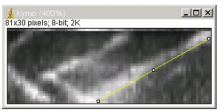
The module can be installed in ImageJ as a Macro Menu and each function/component can be called separately. The full workflow consists in calling some, or all, the functions sequentially in order to get from the image preparation (e.g. filtering and visualization of tracks) to the production of the kymographs (time vs. distance plot) and their analysis (retrieving the velocities).

Here is the full workflow sequence:

  • Load image sequence
  • Crop and time-filter the image sequence ("Walking average" plugin)
  • Generate tracks by z-projection ("Stack difference" plugin)
  • Select tracks and restore them in the original stack.
  • execute plugin "multiple kymograph"
  • Analyse: select edges of moving tracks graphically and quantify movement in a table.

input: 8-bit, 16-bit stacks, 2D in time. Calibrated is better for meaningful velocity measurements.

ouput: the kymograph image, the velocity measurements tables.

Requires ImageJ version: 1.33.n minimum.

Example of applications:

  • velocity of moving objects/ structures with sharp edges, incl. the velocity of microtubules (and their plus ends),
  • the velocity of vesicles or particles along a 2D path
  • the velocity of migration of the edge of a cell or a multicellular group
  • retraction velocity of contractile bundles (e.g. actin fibers) or multicellular tissues after mechanical disruption (e.g. laser surgery)
Description

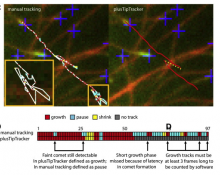
The workflow contains a Matlab package (plusTipTracker) for segmentation and tracking of microtubule tips, based on fluorescence time-lapse movies from microtubule tip markers such as EB-GFP. The tracking model accounts for the specific movement characteristics of microtubules Moreover, scripts for secondary analysis of detected microtubule paths are provided.

plusTipTracker is part of u-track 2.0 package. The workflow is described in the reference. 

has topic
has function
Description

The Huygens Software Suite consists of different image processing packages with functionalities that include deconvolution, interactive analysis, and volume visualization of 2D-3D multi-channel and time series images from fluorescence microscopes such as widefield, confocal, multi-photon, spinning disk, Array Detector, STED, and Light Sheet

Description

ilastik is a simple, user-friendly tool for interactive image classification, segmentation and analysis. It is built as a modular software framework, which currently has workflows for automated (supervised) pixel- and object-level classification, automated and semi-automated object tracking, semi-automated segmentation and object counting without detection. Most analysis operations are performed lazily, which enables targeted interactive processing of data subvolumes, followed by complete volume analysis in offline batch mode. Using it requires no experience in image processing.

ilastik (the image learning, analysis, and segmentation toolkit) provides non-experts with a menu of pre-built image analysis workflows. ilastik handles data of up to five dimensions (time, 3D space, and spectral dimension). Its workflows provide an interactive experience to give the user immediate feedback on the quality of the results yielded by her chosen parameters and/or labelings.

The most commonly used workflow is pixel classification, which requires very little parameter tuning and instead offers a machine learning technique for segmenting an image based on local image features computed for each pixel.

Other workflows include:

Object classification: Similar to pixel classification, but classifies previously segmented objects by object characteristics in a subsequent step

Autocontext: This workflow improves the pixel classification workflow by running it in multiple stages and showing each pixel the results of the previous stage.

Carving: Semi-automated segmentation of 3D objects (e.g. neurons) based on user-provided seeds

Manual Tracking: Semi-automated cell tracking of 2D+time or 3D+time images based on manual annotations

Automated tracking: Fully-automated cell tracking of 2D+time or 3D+time images with some parameter tuning

Density Counting: Learned cell population counting based on interactively provided user annotation

Strengths: interactive, simple interface (for non-experts), few parameters, larger-than-RAM data, multi-dimensional data (time, 3D space, channel), headless operation, batch mode, parallelized computation, open source

Weaknesses: Pre-built workflows (not reconfigurable), no plugin system, visualization sometimes buggy, must import 3D data to HDF5, tracking requires an external CPLEX installation

Supported Formats: hdf5, tiff, jpeg, png, bmp, pnm, gif, hdr, exr, sif